


timing issues


Thread Starter
|
HCF Member
Joined: Nov 2006
Posts: 1,693
From: San Luis Obispo, Ca
 RE: timing issues
ORIGINAL: babyivan
we understand, but you said before that you werent physicaly able to get it timed right...... how did you manage to get it on the right timing????
are you saying that you pulled the TB cover off and moved the belt over one tooth?
ORIGINAL: Hailchristian
well i think it was just one tooth off. Its louder now, my CAI is really loud...idk whats up with that.
ORIGINAL: RonJ
That's great. What was the solution?
ORIGINAL: Hailchristian
...well i was messing around with the timing and finally got it to right where it should be. its right on the red mark and she is running great.
...well i was messing around with the timing and finally got it to right where it should be. its right on the red mark and she is running great.
are you saying that you pulled the TB cover off and moved the belt over one tooth?


HCF Member
Joined: May 2008
Posts: 118
From: BKLYN
RE: timing issues
ORIGINAL: Hailchristian
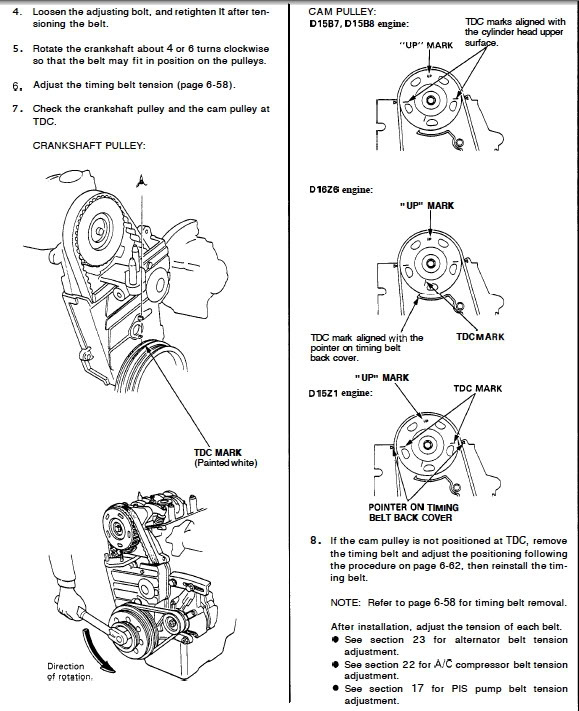
Yes. I lined up the crank to TDC via the red mark and the sight on the timing belt cover, pulled off the crank pulley and the timing belt cover loosened the tensioner, and lined up the the cam to its correct position. It took me a couple tries because the frist time i just tried moving it over a tooth and that didn't work so i tried moving it the opisite way and that didn't work so i finally just pulled everything apart and did it the right way by lining up the crank then lining up the cam and it finally was right where it should be. I then got my timing light out, adjusted the dizzy and now its running pretty good.
ORIGINAL: babyivan
we understand, but you said before that you werent physicaly able to get it timed right...... how did you manage to get it on the right timing????
are you saying that you pulled the TB cover off and moved the belt over one tooth?
ORIGINAL: Hailchristian
well i think it was just one tooth off. Its louder now, my CAI is really loud...idk whats up with that.
ORIGINAL: RonJ
That's great. What was the solution?
ORIGINAL: Hailchristian
...well i was messing around with the timing and finally got it to right where it should be. its right on the red mark and she is running great.
...well i was messing around with the timing and finally got it to right where it should be. its right on the red mark and she is running great.
are you saying that you pulled the TB cover off and moved the belt over one tooth?
But, if your saying that you ended up pulling everything off and did it the right way, then all is good.

Recognized HCF Member
Joined: Sep 2007
Posts: 9,453
From: Houston, Texas
RE: timing issues
I missed that. Hailchristian must have made a typographical error when he wrote that he "lined up the crank to TDC via the red mark." Given that he succeeded in getting the engine properly timed, I think he meant to write "lined up the crank to TDC via the white mark.'
Thread Starter
|
HCF Member
Joined: Nov 2006
Posts: 1,693
From: San Luis Obispo, Ca
RE: timing issues
ORIGINAL: RonJ
I missed that. Hailchristian must have made a typographical error when he wrote that he "lined up the crank to TDC via the red mark." Given that he succeeded in getting the engine properly timed, I think he meant to write "lined up the crank to TDC via the white mark.'
I missed that. Hailchristian must have made a typographical error when he wrote that he "lined up the crank to TDC via the red mark." Given that he succeeded in getting the engine properly timed, I think he meant to write "lined up the crank to TDC via the white mark.'
i feel dumb...lol
well, i drove it to San Francisco and back (360 miles) and it did ok, but it isn't running right. its really loud above 3500 rpm and i guess its cause my timing is off...lol...ok.. i though that the red mark was TDC..i guess i was wrong. Ill try out the white mark tomorrow and let everyone knows how that goes..
hahahah.....im a dumb ***
thanks babyivan and RonJ for your help
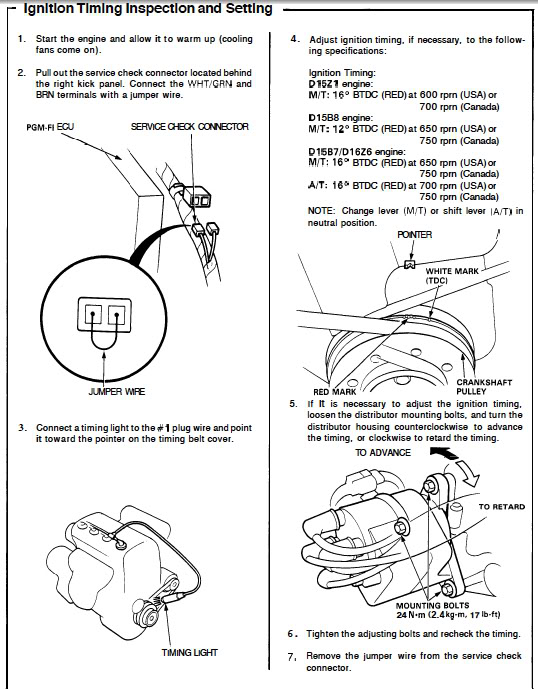
one more thing though..I do get the red mark lined up perfectly with the timing belt cover with my timing light...so i don't know..ill line it up with the white mark tomorrow and see what i get.
Recognized HCF Member
Joined: Sep 2007
Posts: 9,453
From: Houston, Texas
RE: timing issues
ORIGINAL: Hailchristian
...I do get the red mark lined up perfectly with the timing belt cover with my timing light...so i don't know..ill line it up with the white mark tomorrow and see what i get.
...I do get the red mark lined up perfectly with the timing belt cover with my timing light...so i don't know..ill line it up with the white mark tomorrow and see what i get.
-Align the lone white mark on the crankshaft pulley with the sight mark when synchronizing the camshaft and crankshaft at TDC during timing belt installation.
-Align the red mark (middle mark in group of three) on the crankshaft pulley with the sight mark when adjusting the ignition timing with a timing gun.

Recognized HCF Member
Joined: Sep 2007
Posts: 9,453
From: Houston, Texas
RE: timing issues
ORIGINAL: Hailchristian
...I do get the red mark lined up perfectly with the timing belt cover with my timing light...so i don't know..ill line it up with the white mark tomorrow and see what i get.
...I do get the red mark lined up perfectly with the timing belt cover with my timing light...so i don't know..ill line it up with the white mark tomorrow and see what i get.
Thread Starter
|
HCF Member
Joined: Nov 2006
Posts: 1,693
From: San Luis Obispo, Ca
RE: timing issues
ORIGINAL: RonJ
Another possibility is that the engine is running poorly due to a bad distributor sensor(s), as suggested by the CEL code 9. If the timing turns out to be fine but the engine still runs poorly, then clear the ECU. If CEL trouble code 9 returns with driving, then it's time to replace the distributor assembly.
ORIGINAL: Hailchristian
...I do get the red mark lined up perfectly with the timing belt cover with my timing light...so i don't know..ill line it up with the white mark tomorrow and see what i get.
...I do get the red mark lined up perfectly with the timing belt cover with my timing light...so i don't know..ill line it up with the white mark tomorrow and see what i get.
damn..you guys are on it!..thanks for the service manual stuff and ill check it out in like an hour and report back.